Word Carnival - All in One
HI STUDIO LIMITEDWord
4.61.35K Reviews
- Version
- 8.3.10
- Installs
- 500.00K
- Age Rating
- Everyone
Screenshots
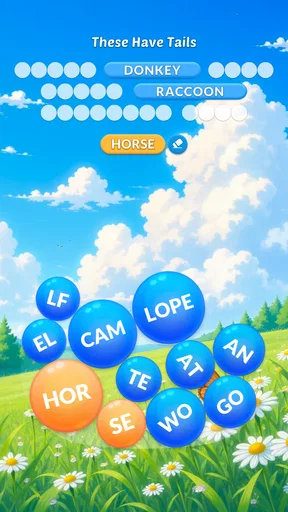
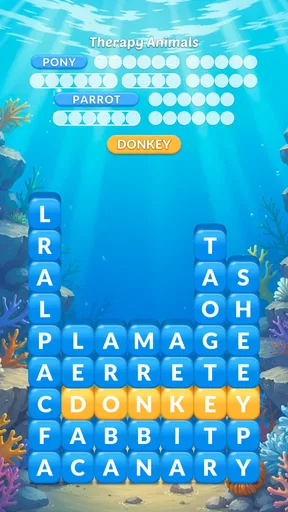
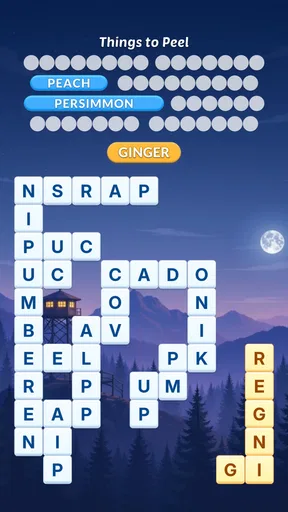
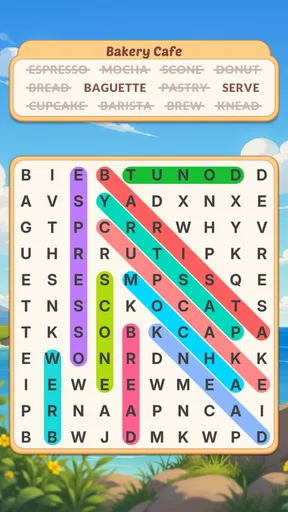
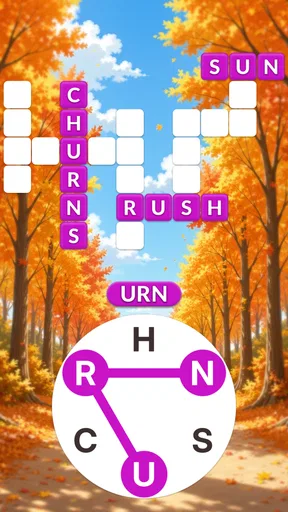
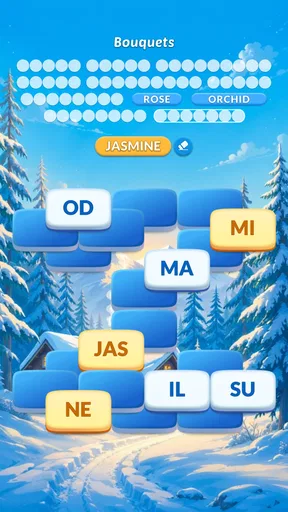
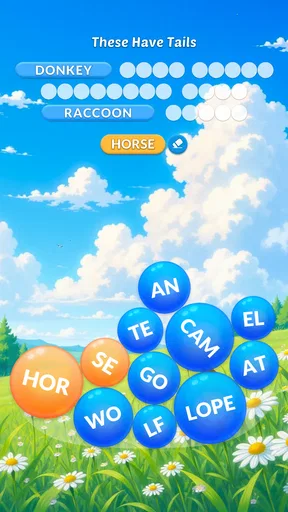
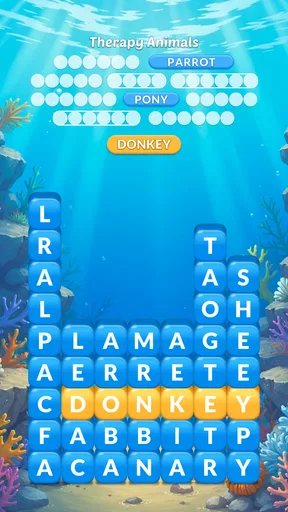
Our Review of Word Carnival - All in One
 Analysis by Appyee
I first approached Word Carnival - All in One as something to play in short gaps rather than as a game I would sit with for an entire evening. That turned out to be the right way to use it. It is a word game from HI STUDIO LIMITED that brings several familiar formats into one place, including word searches, connecting letters, and crossword-style puzzles. The result feels more varied than installing one narrow puzzle app, although the variety also means the experience is not equally strong in every mode.
What makes it interesting in a household is how naturally it can become a shared-device game. Someone can pick it up while waiting for dinner, another person can take over later, and neither needs a long explanation before starting a puzzle. I would not treat it as a family account system or assume that progress is neatly separated between players, but as a casual pass-around activity, it works well. The important distinction is that it offers shared entertainment, not a complete household management solution.
How Word Carnival works when several people use one device
When several people take turns on one device, I find it helps to agree on a simple routine before anyone starts: choose a mode, finish a round, then hand over the screen. That keeps casual play welcoming without relying on separate profiles or assuming everyone wants the same kind of puzzle. It also makes the next question more useful: how does the mix hold up when it becomes part of an ordinary routine?
A practical game for short turns
The three main puzzle styles give the game a useful rhythm. A word search is easy to understand immediately: scan the grid, find the target words, and move on. The connect-style puzzles ask for a little more active thinking because you are arranging or linking letters rather than simply spotting a hidden answer. Crossword-like rounds slow things down further, since they depend more on vocabulary and interpreting clues.
That mix matters when a phone or tablet is shared. A younger player may prefer the visual satisfaction of finding words, while an adult may enjoy the clue-based puzzles. If one person gets stuck, another can look at the same screen and suggest an answer without needing to learn an elaborate control scheme. I found that more useful than a game built around one demanding format, where a single difficulty spike can end the whole session.
There is also a good everyday scenario here: I can imagine leaving the device on a kitchen table during a quiet weekend, with different members of the household completing a few rounds whenever they pass by. The game suits that stop-and-start pattern because its basic activities are self-contained. It does not require a scheduled multiplayer match or a long uninterrupted campaign to feel worthwhile.
What shared play does not solve
Passing the device around is simple, but it should not be confused with synchronized multiplayer. The appeal is taking turns, comparing answers, or discussing a clue while one person holds the screen. I would not choose it if the main goal were a live competition with clearly separated scores, direct challenges, or a strong social layer. Its strength is casual cooperation around puzzles, not structured head-to-head play.
There is another practical issue: a single device can blur progress. If several people use the same game space, one person may advance puzzles that another wanted to solve later. I would agree on a basic household rule before sharing it, such as choosing a mode per person or avoiding unfinished rounds that someone else has started. That small bit of coordination prevents the most common source of frustration.
The best shared-device habit is to treat each puzzle mode as a separate lane. One player can focus on word searches, another can take the crossword-style rounds, and everyone can leave the other sections untouched. This does not create formal profiles, but it gives a household a workable routine without pretending the game has account boundaries that it does not provide.
Setting it up without overcomplicating the experience
Word Carnival is free to install, so the first decision is not whether the household wants to make a large commitment. The more useful question is how the device owner wants to handle optional spending. The game includes in-app purchases ranging from $0.99 to $99.99 per item. That is a wide enough range that I would make the purchasing boundary clear before handing the device to a child or guest.
On a shared phone or tablet, I would keep the device owner responsible for any purchase approval and avoid treating the free download as proof that every part of the experience is cost-free. A child can play without being given control over spending, but that depends on the device’s own purchase protections and the household’s settings. The game itself should not be used as a substitute for those safeguards.
This is also where the difference between a personal device and a communal one becomes important. On my own phone, I can accept that my puzzle progress reflects my habits. On a family tablet, I would first decide whether the game is mainly for one person or for casual rotation. If it is for one person, leaving progress alone is sensible. If it is for everyone, the household should expect some overlap and agree on how to handle it.
Age context and trust
The content rating is Everyone, which makes the game a plausible choice for a broad household audience. That does not mean every child will find every puzzle equally comfortable. Word knowledge varies considerably with reading level, vocabulary, and familiarity with clues. A child may enjoy searching grids but feel discouraged by a crossword-style section that assumes more language experience.
I would introduce it by letting the player choose the most approachable-looking mode rather than insisting on a particular order. This turns difficulty into a personal fit issue instead of making the child feel that a missed answer is a failure. Adults can also use the tougher rounds as a cooperative activity, offering hints without immediately taking over the puzzle.
Trust still matters even with an Everyone rating. A parent or device owner should explain whether the player may use optional purchases, whether they should ask before changing anything, and whether other people’s progress is off-limits. Those are household agreements, not features I would attribute to the game. The app can provide the puzzle content, but the boundaries around access and spending need to come from the people sharing the device.
What the puzzle mix feels like in regular use
In regular use, the variety matters most when I match each puzzle style to the time and attention I have, rather than treating the collection as one continuous challenge. A quick search can suit a spare moment, while clue-based rounds ask for more focus and may be better saved for quieter stretches. That difference shapes the game’s overall mood, including how its presentation and pacing feel from one session to the next.
Word search: the easiest entry point
The word-search format is the most immediately welcoming part of the package. It rewards visual scanning and gives a clear sense of completion once the listed words are found. I like it for moments when I want something active but not mentally heavy, such as taking a short break between chores or winding down without committing to a complicated challenge.
Its limitation is that familiarity can reduce the sense of discovery. Once I settle into the scanning pattern, the mode can feel more like a relaxing exercise than a demanding word test. That is not a flaw for everyone. In fact, it is probably the right choice for a younger player or for someone who wants a calm activity. But people looking for consistently difficult vocabulary puzzles may find the search format less satisfying than a dedicated advanced word-game app.
Connect puzzles: more interaction, more trial and error
The connect-style rounds add a different kind of attention. Instead of only locating words, I have to think about how letters relate to one another and test possible combinations. This makes the mode feel more hands-on and gives it a stronger “one more round” quality than a basic search grid.
The trade-off is that trial and error can become the main activity when the available letters suggest several plausible answers. I prefer using this mode when I have enough time to experiment, rather than when I am distracted. In a shared setting, it is a good conversation mode because another person can notice a word I overlooked. It is less ideal if I want a completely predictable, low-effort puzzle.
Crossword-style puzzles: the best test of vocabulary
The crossword section is where the collection feels most like a traditional brain-training game. Clues require interpretation, and an answer can remain out of reach even when the letters seem familiar. This gives the mode more depth than simply tapping through obvious words, but it also creates the sharpest difference between players.
For adults, this is likely the section with the strongest replay appeal because it asks for recall rather than only recognition. For children, it works better as a guided activity unless their reading confidence already matches the clue difficulty. I would not judge the whole game by a difficult crossword round, and I would not assume that success in word search predicts success here. The modes exercise different skills.
Using the modes as a personal routine
A useful routine is to match the mode to your energy instead of playing whatever appears first. I use word search when I want a gentle reset, connect puzzles when I want a little experimentation, and crossword-style rounds when I am ready to concentrate. This makes the all-in-one design feel purposeful rather than merely crowded.
That approach is also useful on a shared device. A parent can suggest the search mode for a quick child-friendly turn, while an adult uses the crossword section later without anyone needing a separate game. The collection becomes a flexible shelf of activities. The catch is that players who only enjoy one format may prefer a specialized alternative with more depth in that single style.
Progress, pacing, and the value of stopping
Short puzzle games can encourage automatic continuation, especially when each completed round makes the next one easy to start. I found it better to decide on a stopping point before opening the game, particularly when sharing a device with other people. A simple “three puzzles each” rule keeps the experience cooperative and avoids one player occupying the tablet indefinitely.
This is a small but important distinction between personal enjoyment and household use. On my own device, continuing is only my decision. In a family setting, pacing becomes part of the experience. Because the game is designed around repeatable word activities rather than a single narrative, it is easy to pause without feeling that I have abandoned a story or lost the thread of an adventure.
Performance expectations and device fit
The current version is 8.3.10, and the game supports devices running Android 7.0 or later. That makes it relevant to people using an older Android phone or a hand-me-down tablet, provided the device meets that operating-system requirement. I would still judge the experience on the actual shared device, especially if the screen is small or the touch response is inconsistent.
Screen size affects word puzzles more than many other casual games. A larger tablet can make grids and letter arrangements easier for two people to inspect together, while a compact phone is better for private, one-handed sessions. If the household plans to pass the device around, a tablet-sized display is the more comfortable choice, though the game’s minimum operating-system requirement alone does not guarantee that every older device will feel equally pleasant.
How it compares with dedicated word-game alternatives
Compared with a single-format word-search game, Word Carnival offers more variety and reduces the need to install several separate apps. That is its clearest practical advantage. I can move from visual searching to letter connections to clue solving without changing to another title, which is convenient on a device with limited space or for a family that wants one shared option.
A dedicated crossword app may still be better for someone who cares mainly about clue quality, themed puzzles, or a deeper crossword routine. Likewise, a focused word-search game may feel cleaner to a player who wants no distractions from finding hidden words. The all-in-one approach favors convenience and broad appeal over specialization.
It also differs from competitive word games that center on live opponents or social rankings. Here, I would recommend it for quiet individual play and informal cooperation. If your motivation comes from beating a friend in real time, tracking a personal leaderboard, or building a long-term competitive identity, another category of game will probably suit you better.
Who should use it, and who should skip it
I would recommend it to someone who enjoys changing puzzle styles, wants a free starting point, or needs an easy game for occasional breaks. It is especially practical for a household that wants one word-game collection on a shared Android device, as long as everyone understands that shared play may not equal separate profiles or perfectly isolated progress.
It is less suitable for a player seeking one exceptionally deep format. A serious crossword enthusiast may outgrow the broader package, while someone who dislikes clue-based puzzles may spend much of the collection avoiding one of its central modes. I would also hesitate to recommend it as an unsupervised purchase environment for children simply because the content rating is Everyone; the optional purchase range makes household spending rules important.
The game has attracted an average rating of 4.6 from around 22 thousand ratings, with roughly 1.3 thousand written reviews, and it has passed 500 thousand installs. Those figures suggest that the basic concept has found a substantial audience, but they do not replace personal fit. The real question is whether you value a convenient mixture more than the depth of a specialist puzzle app.
Developer, cost, and the practical decision
HI STUDIO LIMITED presents this as a free word game, which lowers the barrier to trying the different formats before deciding whether it belongs on a personal or family device. I would begin with a clear purpose: use it as a short-break game, a shared puzzle activity, or a vocabulary exercise. Knowing that purpose makes it easier to ignore modes that do not suit you instead of treating every section as something you must complete.
The in-app purchase range deserves a second look before a child uses the device. A low-cost optional item and a much higher-priced item do not carry the same household risk, so I would keep approval with the account owner. This is not a reason to reject the game, but it is a reason to separate “free to start” from “safe to hand over without supervision.”
Because the game is rated Everyone, it can fit mixed-age use better than many word titles aimed at adults. Still, I would play alongside a younger user at first, not to police every answer but to see which modes match their reading ability. That first shared session can reveal whether the game feels encouraging or frustrating before it becomes a regular activity.
My household verdict
After using it across different kinds of short sessions, I see Word Carnival as a flexible word-game collection rather than a definitive replacement for every specialized alternative. Its strongest idea is practical: one installation gives a household several recognizable ways to play. That makes it easy to recommend when convenience, variety, and casual sharing matter more than advanced depth.
My main caution is to establish boundaries around the shared device. Decide who owns the progress, agree on turn length, and keep optional purchases under the account holder’s control. Those three steps address most of the friction I would expect from household use without claiming that the game includes family profiles or coordination tools.
For a solo player, I would choose it when I want to switch between visual searching, letter connecting, and crossword-style thinking depending on my mood. For a family, I would choose it as a pass-around puzzle activity, especially on a larger screen where people can discuss answers together. I would skip it only if I wanted a highly specialized crossword experience, a strongly competitive multiplayer format, or completely separate progress for every user.
Overall, Word Carnival - All in One earns its place through range rather than complexity. It is free to try, suitable for Everyone, and available for Android devices using version 7.0 or later. With sensible spending and sharing rules, it becomes a friendly household option: easy to start, varied enough for different ages, and honest about its role as a casual collection of word puzzles rather than a full family gaming platform.
Verdict
Strengths of Word Carnival - All in One
- Includes multiple word games in one convenient app.
- Short rounds make it easy to play during quick breaks.
- Helps expand vocabulary through varied word challenges.
- Bright visuals and cheerful themes create a friendly experience.
- Suitable for casual players who prefer relaxed gameplay.
Limitations of Word Carnival - All in One
- Some puzzles may feel repetitive after extended play sessions.
- Difficulty can vary noticeably between different game modes.
- Hints and extra resources may be limited without in-app purchases.
- Requires occasional internet access for certain features or updates.
- Ads may interrupt gameplay, especially between completed rounds.
Other Releases by HI STUDIO LIMITED
View All
Similar Picks in This Category
View All
Word Search - Word Puzzle Game
Bluetile4.8

Word Search Quest - Puzzles
Blackout Lab4.8

CodyCross: Crossword Puzzles
Fanatee, Inc.4.7

Words of Wonders: Crossword
Fugo Games4.9

Wordscapes: Word puzzle game
PeopleFun4.7

Word Search Explorer
PlaySimple Games4.9
Frequently Asked Questions
What is Word Carnival - All in One?
Word Carnival - All in One is a casual word-game collection designed for players who enjoy solving puzzles in different formats. Instead of focusing on only one challenge, the app brings several word-based activities together in one place, making it suitable for short sessions or longer play. It is generally easy to start, although some later puzzles may require careful thinking and a broad vocabulary.
Is Word Carnival - All in One free to download and play?
The game can typically be downloaded at no initial cost, allowing users to try its main features before deciding whether they want to spend money. However, free mobile games may include advertising, optional in-app purchases, or both. These purchases can sometimes provide hints, remove ads, or unlock additional content. Check the store listing on your device for the current pricing and purchase details.
Does Word Carnival - All in One require an internet connection?
Some parts of Word Carnival - All in One may work without a constant internet connection, which is convenient when traveling or playing in areas with weak reception. Nevertheless, an internet connection may be needed for downloading the game, displaying advertisements, synchronizing progress, updating content, or processing purchases. Offline availability can also vary after updates, so confirm the app’s current requirements before relying on it without mobile data.
Is Word Carnival - All in One suitable for children and families?
The simple word puzzles and casual presentation can make Word Carnival - All in One appealing to families, students, and players who want an educational style of entertainment. Still, parents should review the recommended age rating, advertising, in-app purchase options, and privacy information before allowing younger children to play. Difficulty and vocabulary requirements may also vary, so the experience will not be equally comfortable for every age group.
What should I know about hints, ads, and game progress?
Hints can be useful when a puzzle becomes difficult, but they may be limited, earned through gameplay, or connected to optional purchases. Advertisements may appear between rounds or when players request extra rewards, depending on the version and device. Progress handling can also depend on local storage or account-related features. Before uninstalling the app or changing devices, check whether your progress can be backed up or restored.
Play our best games!


